Drone Flying on Mobile: Using Apps to Fly and Plan
By Michael Chen · Published · 5 minutes read
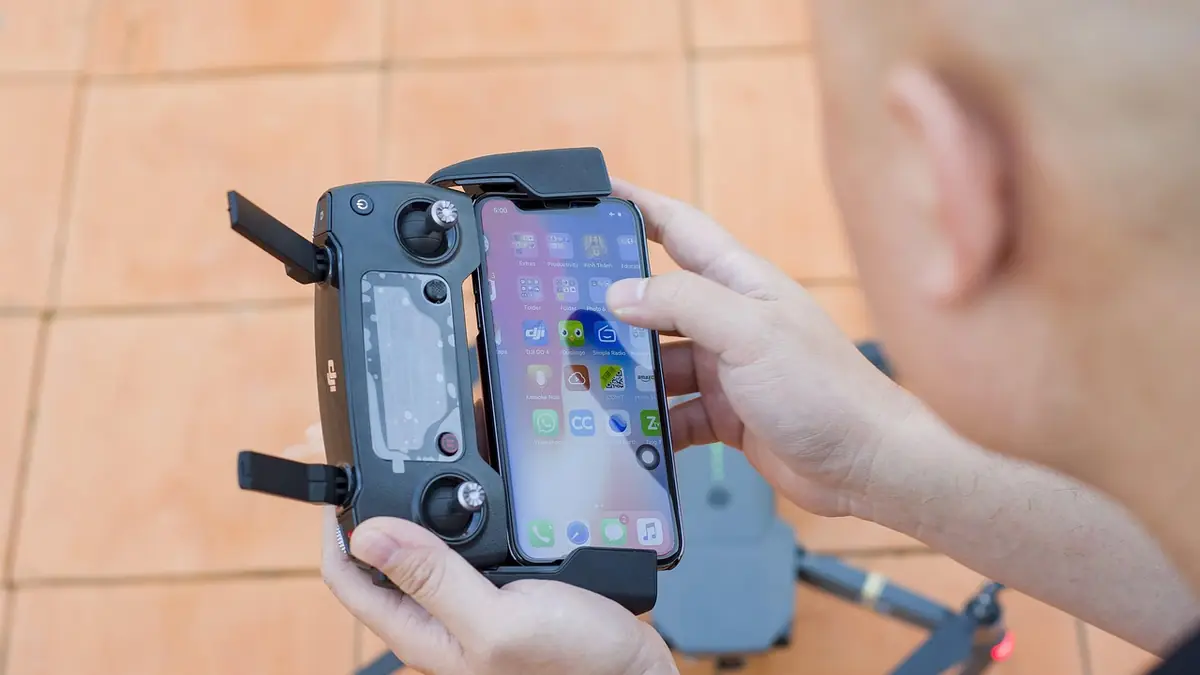
Most modern drones lean on a phone or tablet for something. Sometimes it is the whole flight experience through a manufacturer's app, sometimes it is just the pre-flight routine: checking airspace, pulling a weather briefing, confirming a NOTAM. Either way, the mobile device has become a real part of the kit, not an accessory.
That shift changes how pilots prepare. A screen that fits in your pocket can make airspace and weather checks faster, but it also introduces failure points — a dead battery, a lost signal, a pop-up during a critical manoeuvre. The trick is knowing which jobs a phone does well and which still belong to a dedicated controller or a paper backup.
What Mobile Apps Actually Do in a Drone Workflow
Mobile software generally falls into four jobs: airspace and NOTAM checks, weather briefing, flight logging and maintenance tracking, and the actual control link through a manufacturer app. The first three are planning tasks you do with both feet on the ground, and they are where phones are genuinely strong. The fourth is where the risk sits, because your control link now depends on a consumer device.
For planning, apps that show controlled airspace, temporary flight restrictions and nearby aerodromes are quick and legible. Weather apps that report wind at altitude, visibility and precipitation probability are useful for a go/no-go call. Logging apps keep your hours and battery cycles in one place. None of this replaces a proper pre-flight inspection, but it shortens the desk work before you leave.
The practical rule: use the phone for everything that happens before the props spin up, and treat it as a backup rather than the primary instrument once the aircraft is airborne.
- Airspace and NOTAM checks before leaving home
- Weather briefing and go/no-go decisions
- Flight logging, battery cycles, maintenance notes
- Manufacturer app for camera settings and flight modes
Choosing a Device That Survives the Field
Screen brightness matters more than most specs. On a bright day, a phone that looks fine indoors can be unreadable in the open, which pushes you to shade it or crank brightness — both of which drain the battery fast. Look for a display that stays legible at around 700–1,000 nits, and plan to fly with a sun hood in summer.
Battery and heat are the other two constraints. A phone running a live video feed and GPS will typically drop 15–25% of its charge per 20-minute flight, and in direct sun it can overheat and throttle. Keep the device out of the sun between flights, avoid charging it in a hot car, and carry a power bank rated for at least 10,000 mAh.
Tablets give you a larger map and camera view, which helps for mapping or inspection work, but they need a proper mount so the controller stays balanced. Whatever you use, put it in a case and a lanyard — a dropped phone mid-setup is the most common avoidable incident in this workflow.
The Weak Link: Signal, Cables and App Updates
The cable between controller and phone fails more often than the radio link does. Carry a spare short data cable (not a charge-only one) and inspect the connector for lint and bent pins. If the app disconnects mid-flight, the aircraft typically holds its position or continues its mission depending on the mode — but your ability to change settings or trigger return-to-home from the screen is gone until the link re-establishes.
App updates are the quieter risk. A release the night before a job can change menu layouts, reset camera preferences, or introduce a bug. Set updates to manual, install them at least a few days before a scheduled flight, and test on the ground. The same applies to the aircraft firmware: never update in the field with a client waiting.
If the mobile device is your only display, that is a single point of failure. A controller with a built-in screen, or a second device logged in and ready, covers the case where the phone dies or the app crashes.
- Carry a spare data cable, not a charge-only cable
- Set app and firmware updates to manual
- Test every update on the ground before a job
- Have a second display option for paid work
| Device type | Battery drain per flight | Screen legibility in sun | Best use |
|---|---|---|---|
| Mid-range phone | 15–20% | Poor without hood | Planning, logging |
| Flagship phone | 15–25% | Good to fair | Primary display |
| Small tablet (8 in) | 20–30% | Fair with hood | Mapping, inspection |
| Large tablet (10 in+) | 20–30% | Good with hood | Client-facing view |
| Controller with built-in screen | N/A (own battery) | Good | Primary display, redundancy |
Planning and Logging Without a Desk
A phone lets you do the paperwork at the site instead of at home. You can confirm the airspace class, check for NOTAMs issued since your morning briefing, and photograph the launch area for your records. That is valuable for sites you have not flown before, where the map and the ground truth do not quite match.
Flight logging is where mobile really earns its place. Logging apps timestamp the flight, record duration and location, and prompt you for battery and maintenance notes. Over a season this builds a useful picture: which batteries are fading, how many hours are on the airframe, when the last propeller change happened. That history matters at resale and if anything is ever questioned after an incident.
Pair the logging habit with a written checklist on the device — a simple note or checklist app is enough. It keeps the routine consistent and makes it easier to hand a job to a colleague who flies the same aircraft.
Where Mobile Stops and Rules Begin
No app grants permission to fly. Airspace authorisations, night operations, and flights over people are governed by your regulator, and the app is only a map and a form-filling tool. If an app shows clear airspace but the local rule says otherwise, the rule wins. Treat the map as a prompt to check the source, not as the source itself.
This is also where the association side of things matters. Knowing the current rules for your category, and having insurance that matches the work you do, is more important than any screen. If you fly commercially, the cost of licensing and cover is a fixed part of the budget; the phone is just the tool you use to check that everything is in order before you launch.
Building a Reliable Mobile Setup
A dependable setup is boring: one primary device, one spare cable, one power bank, one sun hood, one mount that does not wobble. Label the cables. Keep the device charged to full before every session and never rely on the field to top it up. If you fly for clients, run the whole routine once at home with the app in its final state.
The habit that prevents most problems is a short ground check: app open, aircraft connected, GPS locked, home point recorded, battery levels on both devices confirmed. That takes under two minutes and catches nearly every mobile-related failure before it matters. It is the same discipline as the physical walk-around, just applied to the screen.
- One primary device, one tested spare cable
- Charge to full, carry a 10,000 mAh power bank
- Confirm app connection and home point before take-off
- Log every flight the same day
- Use the phone for planning, weather and logging; treat it as a backup in flight
- Carry a spare data cable and a 10,000 mAh power bank
- Set app and firmware updates to manual and test on the ground
- No app grants airspace permission — check the rule, not just the map
Michael is a remote pilot and editor with years of experience in drone operations and regulation. He focuses on providing practical guidance to both hobbyists and commercial pilots. His aim is to make complex rules accessible to everyone.